

How to enter an older Renault radio code
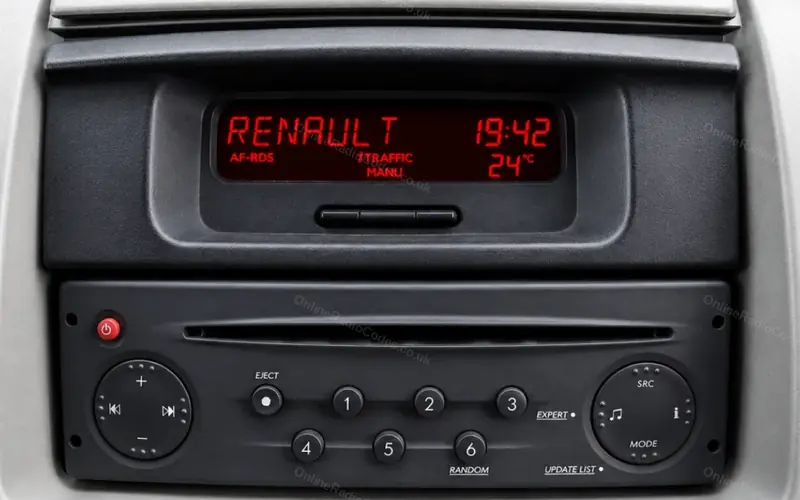
Tuner List and Update List radios in the Clio II and III, Megane I and II, Scenic, Kangoo, Modus, Twingo, Laguna, Trafic and Master. On many of these cars the display is on the dashboard, not on the radio.
Type it and every step uses your own digits. It stays on this page.
Switch the radio on. The display shows CODE, then 0000 with the first digit flashing.
Every step
Digit entry and the wait are from Renault's Radiosat manual. The manual shows the confirm button only as a number on a drawing, so preset 6 rests on owners' reports.
If it locks
A wrong code shows CODE ERROR and WAIT 99. Wait two minutes, then enter the code again. The wait doubles with each wrong code. Keep the radio and the ignition switched on while it counts: owners find it only counts down with the car on. What each lockout screen means
Each preset changes its own digit?
Some of these radios work that way: preset 1 sets the first digit, 2 the second, 3 the third and 4 the fourth. Watch which digit flashes and what each press does, and put any digit right before you confirm.
Holding preset 6 does nothing?
Renault's manual shows the confirm button only as a number on a drawing. Owners report preset 6 on most of these radios and preset 5 on some older ones.
Using the control behind the steering wheel?
Turn the thumbwheel until the flashing digit is right. Press the button on the end of the stalk briefly to move to the next digit, and set it the same way. After the fourth digit, press and hold that button until the radio beeps.
Display asks for CURVE, then a region?
That is normal the first time the code goes in. For CURVE choose 0 and for the region choose OTHERS, which means Europe: preset 2 or the thumbwheel changes the choice. Confirm each one with a long press, as you did the code. The radio then unlocks.