100% Money Back Guarantee The World's Leading Car Radio Code Service Trusted by 1,000,000+ customers
Toyota Toyota · Radio Codes
Instantly Displayed

Toyota ERC Radio Code

Toyota and Lexus radio code from the 16-digit ERC, generated instantly. Unlocks the navigation after a battery disconnect.

Enter your serial number
Over 1 million codes delivered worldwide.
Not sure which serial to enter? See examples
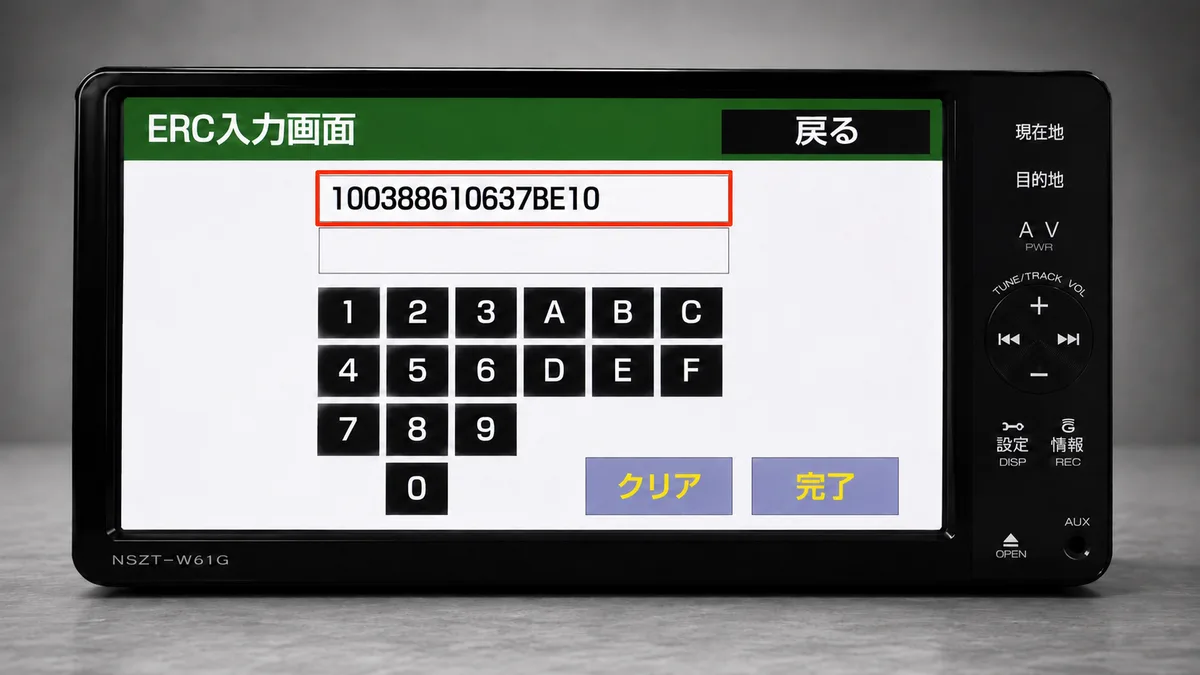
Enter the 16-character ERC code exactly as shown on your unit's ERC input screen.
Instant Money back guarantee Secure checkout

Step 1 of 3

How to find your Toyota serial number

The guide below will show you exactly where to find your Toyota radio serial number.

Press the radio keys (works on most units)
Method 1
Press the radio keys (works on most units)
This is the most reliable method and works on the modern range (NSZT, NSCN, NSCP, NSZN and the W68 / Y68 / Z68 series) as well as older units.

1. Turn the navigation unit on.
2. Press and hold the main "current location" button (the map button - on older units this is the physical Ginfo button).
3. While holding it, switch the car's parking / side lights on and off 3 to 4 times until a new screen appears.
4. Press the only button that is lit up on that screen.
5. Your 16-digit ERC code is displayed (shown next to 解除コード). Enter it in the box above.
Method 2
Settings button and hidden screen taps
Use this if the parking-light method does not bring up the screen (common on some NSZT / NSCP touch units).

1. Press and hold the Settings (設定) or round MENU button on the right edge of the unit until the screen-brightness / picture-adjustment screen appears.
2. Tap the hidden corners in sequence: top-left, then bottom-left, repeated 3 times.
3. The service menu opens. Go to Service Information → Security Release Code Input.
4. The 16-digit ERC is shown at the top of the ERC input screen.
Method 3
Power-on button combination (last resort)
If neither method above works, some units expose the service menu with a button combination held while the unit powers on, for example MENU + Volume-Up + Power or Setup + Seek-Up + Power. The exact combination varies by model and software version, so try this only if Methods 1 and 2 fail.
Enter Code
Enter your unlock code on the unit
Once you receive your 8-character unlock code, type it on the unit's on-screen keypad (it uses 0-9 and A-F), then press 完了 / 入力終了 (Complete). Your navigation unlocks immediately.
What your Toyota serial looks like
ERC 2084006700000000
ERC 005459398ECD6928
ERC C1B11461B3B0F020
Can't find it? Contact us. We'll help you locate your serial before you pay a penny.

Why choose us

The World's Leading Toyota Radio Code Service

World's No.1
OnlineRadioCodes.co.uk is the world's leading supplier of car radio codes, with over 1 million codes delivered since 2015. Our radio experts are on hand to help you every day.
Instant delivery
Most codes appear on screen the moment payment clears. For brands that require manual lookup, our team typically delivers within the hour during business hours.
Money back guarantee
If your code does not work, we refund you in full. No questions, no hassle. We are one of very few radio code companies to back every order with a complete money back guarantee.
Lifetime retrieval
Misplace your code weeks or even years from now? Just get in touch and we will resend it free of charge, every time. One purchase gives you access for life.

FAQ

Frequently asked questions

Why does my Toyota or Lexus navigation need an ERC code?
Toyota genuine navigation and audio units have an anti-theft lock. When power is lost - a flat battery, a battery change, or the unit being removed - the system locks and shows the ERC input screen. It will not work again until the correct unlock code is entered. This is most common on Japanese import vehicles after shipping.
What is an ERC code?
ERC stands for Electronic Registration Code. It is the 16-character code your navigation unit displays on the ERC input screen. We convert that 16-character code into the 8-character unlock code that releases your unit.
How do I display the 16-digit ERC on my unit?
On most units: turn the unit on, press and hold the main current-location button, and switch the car's parking lights on and off 3 to 4 times until a new screen appears. Press the only active button and the 16-digit ERC is shown. See the step-by-step methods above for alternatives if this does not work.
Which units and cars does this cover?
It covers Toyota and Lexus genuine dealer navigation units - including the NSZT, NSCN, NSCP, NSZN, NHZD and NHDT families (W68 / Y68 / Z68 and older). These are fitted across the Japanese range, so it applies to imported models such as the Prius, Aqua, Vitz, Corolla, Camry, RAV4, Harrier, Alphard, Vellfire, Noah, Voxy, Land Cruiser, Hilux and 86.
How long does it take?
It is instant. Enter your 16-digit ERC, complete the order, and your unlock code is generated and shown to you immediately, with a copy emailed to you.
Does one code work for every type of unit?
Yes. The unlock works the same way for every ERC unit, including the W68 / Y68 / Z68 variants and older pre-W68 units. You do not need to know your exact model - just enter the 16-digit ERC.
The screen is all in Japanese. How do I read it?
Point your phone at the screen using Google Translate live camera mode to read the buttons in your language. Use it to understand the labels only - read the actual 16-digit code yourself, character by character, because live translation can misread code characters (for example O instead of 0, or B instead of 8).
My code does not work. What should I do?
First re-check the 16-digit ERC for misread characters (O vs 0, B vs 8). If the ERC is correct and the code still does not work, contact us and we will investigate at no extra charge. Every code is guaranteed or your money back.

Verified · Trustpilot

Don't just take our word for it

See all reviews on Trustpilot
5 stars
5 hours ago Trustpilot

Explican muy bien donde localizar los…

Explican muy bien donde localizar los datos q te piden en cada modelo de radio,si tienes duda puedes preguntar por chat y te responden al momento.al día sigu…

Ovidio · ES
5 stars
8 hours ago Trustpilot

Quick and easy

Needed a new code for my car and I used onlineradiocodes and I am happy I did.

A. Kondé · GB
5 stars
13 hours ago Trustpilot

Merci pour la récupération de ma…

Merci pour la récupération de ma radio..très précise. Un bon dialogue jusqu'à arriver au bout

Marie -Claude Naulot · FR
5 stars
13 hours ago Trustpilot

Service parfait

J'ai fait appel à OnlineRadioCodes car suite à une panne electrique de ma voiture mon ordinateur de bord ne fontionnait plus J'ai reçu le code dans la minute…

jean-michel GUIBAL · FR
5 stars
17 hours ago Trustpilot

Un site sérieux

Un site sérieux, j'ai reçu le code une demi heure après avoir effectué le payement. Je suis vraiment satisfait.

Javor Show · FR
3 stars
20 hours ago Trustpilot

Leider Passt dieser Code nicht mit dr…

Leider Passt dieser Code nicht mit dr Vin Nummer hat das ganze nichts zu tun. schade

Thomas Schaaf · DE
5 stars
20 hours ago Trustpilot

Schnell und unkompliziert.

Schnell und unkompliziert.

Melanie Birkl · DE
5 stars
1 day ago Trustpilot

Tutto ok

Tutto ok, il primo codice ha funzionato senza problemi.

Roberto · IT
5 stars
1 day ago Trustpilot

C est la première fois que je visite…

C est la première fois que je visite votre cite et sa bien marcher, la selle remarque ;est que vous affichez que sa prend 30 minutes et par contre sa fait 14…

Boyah · MR
5 stars
2 days ago Trustpilot

Code correct and customer sevice is…

Code correct and customer sevice is excelent thats why 5 stars. Code arrived after 24 hours , but it was good one so ... 5 stars

Dragon · ME
5 stars
2 days ago Trustpilot

I was discouraged by my mechanic that…

I was discouraged by my mechanic that radio can work and let me buy a new one but I decided to go online and search for options. You happened to be my choice…

Malish Simbe Emmanuel · SS
See our 22,072 reviews on Trustpilot

Ready to unlock your Toyota radio?

Enter your serial number above and get your unlock code in seconds.

Get my code now
We are an independent radio code retrieval service and are not affiliated with Toyota Motor Corporation or Lexus. All trademarks are the property of their respective owners.
Get my radio code