


Guide
Where to find your car radio serial number, brand by brand
On many Ford, Honda, Nissan, Vauxhall and BMW radios you can bring the serial number up on the screen with the buttons, with no tools. VW, SEAT, Skoda, most Audi, Fiat, Peugeot and Citroën radios only have it on a label on the casing, so the radio has to slide out. That label also carries a part number, which is not the serial. A VW group serial is always 14 characters and starts VWZ, AUZ, SEZ or SKZ.
Two places to look: the screen or the label
We answer this on our chat every week, often from someone who already has a screwdriver in their hand. Before you take anything apart, check whether your radio can show its serial on the screen. Plenty of them can, and it takes about a minute.
Your radio code is tied to the radio's serial number, which the maker sets when the radio is built. Some radios will show it on the screen if you hold the right buttons or enter a wrong code a few times. Almost all of them also have it on a label on the casing, and that label can only be read with the radio slid out of the dashboard.
Renault and Dacia work differently. Their codes come from the car's VIN, so on most of them nothing needs to come out at all. Newer Suzuki touchscreens are the same.
Where the serial is on each make
Find your make below, then read the section that matches. Each make's own page has photos of every screen and label we mention.
| Make | On screen? | Where to look |
|---|---|---|
| Ford | Most radios | Hold buttons 1 and 6 (2 and 6 on Sony units). One letter and six digits, such as V062049. TravelPilot and Visteon units: the label. |
| Honda | Most radios | Hold presets 1 and 6 (1, 6 and Power on some). A U and L pair, such as U2154 L2135, or one serial number. Navigation and touchscreen units: a hidden diagnostics menu. |
| Nissan | Connect, Daewoo, Visteon | Enter any wrong code three times and note every number the screen shows. Clarion (CL, PN, PP) and Blaupunkt (BP): the label. |
| Vauxhall | Connect and sat nav | Enter any wrong code three times, then note the serial, device number and date. Vivaro and Movano vans: the label. |
| BMW | Business and Professional | Hold the m button for up to 10 seconds. Otherwise the label, starting BP, BE, PH or AL. |
| Audi | RNS-E only | The bottom edge of the RNS-E screen. Every other Audi: the label. 14 characters starting AUZ. |
| Mercedes | Comand | The bottom of the Comand screen. Audio 10 and other units: the label, starting AL, MF or BE. |
| Toyota (Japanese market navigation) | Yes | A hidden screen shows a 16 character ERC code, which we use instead of a serial. |
| VW, SEAT, Skoda | No | The label. 14 characters starting VWZ, SEZ or SKZ. |
| Renault, Dacia | No, use the VIN | The VIN first. On the label: a letter and three digits, or a number starting 2811, 8200 or 7700. |
| Fiat, Lancia, Alfa Romeo | No | The label. Most start BP, 815CM, A2C or A3C. |
| Peugeot, Citroën | No | The label. Starts BP, 815BP, 815CM, A2C or CL. Older Philips units have a letter and three digits on the front. |
Makes that show the serial on screen
Ford. Turn on the ignition and the radio, then hold buttons 1 and 6 together for about two seconds. The serial appears as one letter and six digits. Radios up to 2008 start with V, from 2008 with Z, and from 2018 with A. Sony units use buttons 2 and 6 and start with M. If an M serial comes up in two halves, join them with no space. Nothing after two tries on 1 and 6? Try 2 and 6.
Honda. On radios without a navigation screen, hold presets 1 and 6 together for about two seconds, or 1, 6 and Power on some units. You will see either a U number and an L number, such as U2154 L2135, or a single serial number. Enter whichever your screen shows. Touchscreens from 2013 and navigation units from 2003 to 2012 keep the serial in a hidden diagnostics menu, under Unit Check. The Honda page lists the button combinations that open it.
Nissan. Connect, Daewoo and Visteon radios show the serial once you enter a wrong four digit code three times, 0000 for example. The screen locks and shows the serial along with a device or part number, and on most a date. Write down everything on that screen, because the order needs all of it. On a Nissan Connect, only the serial on the screen works, not the one on the label. A few Visteon units show a Seed number instead, and for those you also need the part number starting 2818 from the label.
Vauxhall. Connect and sat nav units work the same way. Enter any wrong four digit code three times and the screen shows the serial number, device number and date. You need all three.
Audi RNS-E. Switch the unit on and the serial runs along the bottom edge of the display. It is 14 characters, starts AUZ, and the sixth character is always 7.
Mercedes Comand. Switch it on and look at the bottom of the screen for a serial or unit number. If there is nothing there, it is on the label. If your screen says anti theft protection, that is a different lock from the radio code, and it has its own page.
BMW. Business and Professional units have a service menu that shows a short serial. Turn the key to the first position, switch the radio off and on, then hold the m button for up to 10 seconds, or the TP button if m does nothing. Scroll down to the serial number.
Toyota navigation from Japan. The NSZT, NSCP and NSCN units and the W68, Y68 and Z68 series, common on imported cars, use an ERC code instead of a serial. Hold the current location button and switch the side lights on and off three or four times until a new screen appears, then press the one button that is lit. The 16 character ERC code is on that screen.
Makes where the serial is on the label
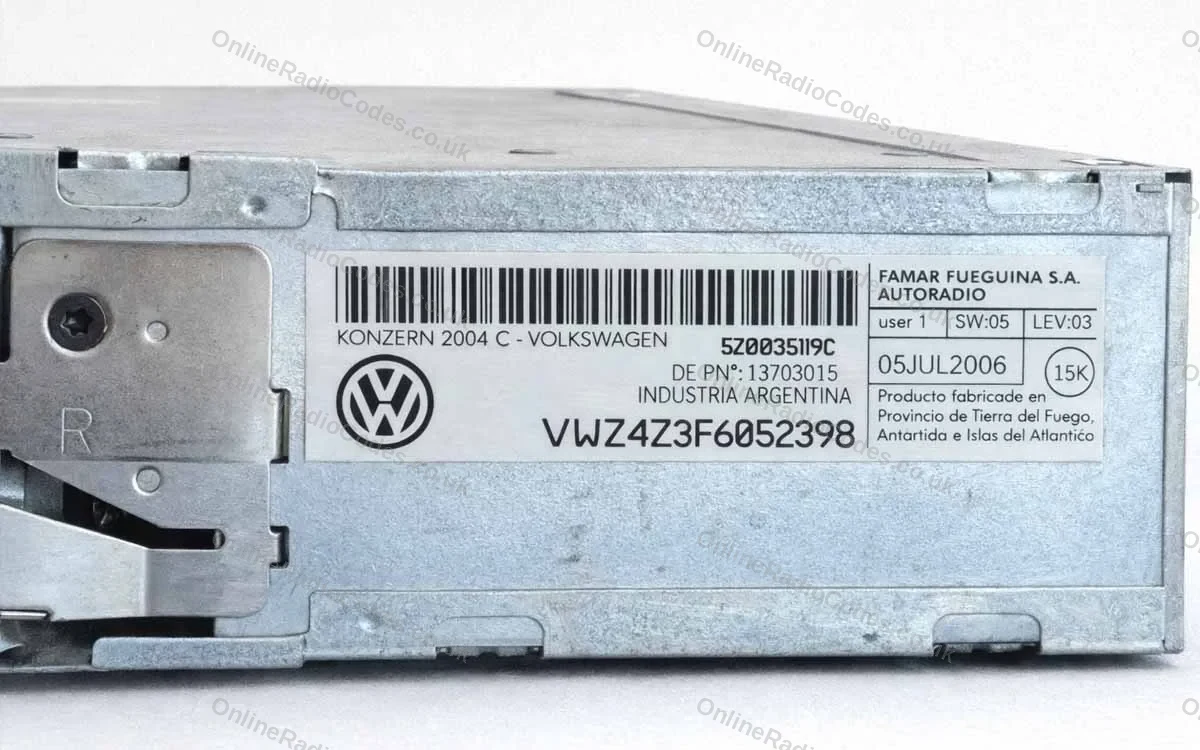
VW, SEAT, Skoda and Audi. Apart from the Audi RNS-E above, there is no screen route on these. The serial is on a sticker on the side or back of the casing: 14 characters starting VWZ, SEZ, SKZ or AUZ, like VWZ4Z3F6052398 in the photo at the top of this page. A capital I and the number 1 look almost the same on these labels, so check each one before you type it.
Renault and Dacia. Start with the VIN. On most Renault and Dacia cars it finds the code with nothing to remove, as long as the radio is the one the car was built with. If the radio has been changed, the label shows one of these:
- a letter and three digits, such as H758, often the last four characters of a longer barcode in a box marked Security, Pre Code or Code
- a number starting 2811, where you want the boxed number near the bottom, not the part code at the top
- a barcode starting 8200 or 7700, entered in full
Trafic and Master vans with a Visteon radio have no screen route either. Their label gives a barcode serial of about 11 characters and a part code starting 281, and the order needs both.
Fiat, Lancia and Alfa Romeo. The label is on the side or back of the casing. Most serials start BP followed by 12 digits, or 815CM, or A2C or A3C followed by a long run of digits. Some smaller units carry other shapes, and the Fiat page shows each label with a photo.
Peugeot and Citroën. Label only. Blaupunkt and Continental units start BP, 815BP, 815CM or A2C. Peugeot Clarion units start CL, and the page asks for two more references from the same label. On the Becker RNEG navigation unit the serial is one letter and seven digits, not the model number starting BE. Older Peugeot Philips radios have a letter and three digits printed on the front of the radio.
The label units on other makes. Ford TravelPilot (BP or C7) and Visteon (VC) units, Nissan Clarion (CL, PN or PP, 14 characters) and Blaupunkt (BP and 12 digits), Mercedes Audio 10 and Becker, and BMW units with no service menu all have the serial on the label only. On older BMW units it can be stamped into the metal casing instead. If a Honda radio shows nothing on screen, its label is on the top, side or back of the casing, usually 6 to 14 characters.
The serial is not the part number
Most labels carry two or three numbers, and the one that looks most official is often the part number. The part number says which model of radio it is, so thousands of radios share it. The serial belongs to your radio alone, and it is the only one a code can come from.
- VW. On the label in the photo at the top, 5Z0035119C is the part number. The serial is the bottom line, VWZ4Z3F6052398.
- Renault 2811 labels. Use the boxed number near the bottom, not the part code at the top.
- Becker RNEG on Peugeot and Citroën. Use the Serial No., one letter and seven digits, not the Model No. starting BE.
- Nissan Connect. Use the serial from the screen, not the one on the label.
If the box on your make's page will not take a number, check it is not the part number. Still not sure? Send a photo of the whole label to our chat and we will tell you which line to use.
Taking the radio out to read the label
Older radios have four small holes or slots in the corners of the front panel. Push a pair of radio release keys into them, press gently outwards and the radio slides forward. There are no wires to disconnect, because it comes out far enough to read the label as it is. Release keys cost very little at any car parts shop.
Newer and touchscreen units sit behind a trim surround. Ease the trim off with a plastic trim tool, undo the mounting screws and slide the unit forward.
Take a photo of the label before you push the radio back in. Labels are easy to misread in a dark footwell, and a photo saves you taking it out twice.
Cannot get it out? Check the table first, because your radio may show the serial on the screen, and Renault and Dacia work from the VIN. If yours really does have to come out, a garage or car audio fitter can slide it out and read you the label in a few minutes.


Questions we get asked
It depends on the make. Ford, Honda, Nissan, Vauxhall and some BMW radios can show it on the screen. VW, SEAT, Skoda, most Audi, Fiat, Peugeot and Citroën radios only have it on a label on the casing. The table in this guide shows where to look on yours.
On many radios, yes. Ford and Honda show it when you hold presets 1 and 6. Nissan Connect, Daewoo and Visteon units, and Vauxhall Connect, show it after three wrong code entries. The Audi RNS-E and Mercedes Comand show it along the bottom of the screen, and BMW Business and Professional units through the m button. VW, SEAT, Skoda and Fiat radios have no screen route.
Most older radios come out with a pair of release keys pushed into the four holes in the corners of the front panel. The radio slides forward and no wires need undoing. Newer units need the trim surround eased off and a few screws undone.
Check whether your make shows the serial on the screen first. Renault and Dacia codes come from the VIN, so nothing needs to come out. If yours only has a label, a garage or car audio fitter can slide it out and read it in a few minutes.
The serial from the screen, if your radio can show one, or the VIN on Renault, Dacia and newer Suzuki touchscreens. For Nissan and Vauxhall Connect units we also need the other numbers shown on the same screen.
Most labels carry a part number as well as the serial. The part number is shared by every radio of that model, and the serial is unique to yours. On VW group labels it is the 14 character line starting VWZ, AUZ, SEZ or SKZ. On other makes, send a photo of the whole label to our chat and we will point to the right line.
Ready to unlock your radio?
Choose your make, type the serial number and we take it from there.