100% Money Back Guarantee The World's Leading Car Radio Code Service Trusted by 1,000,000+ customers
Chrysler Chrysler · Radio Codes
Est. 30 Minutes

Chrysler Radio Code

Your Chrysler radio code comes from the radio serial, shown either on the screen that asks for the code or on the label on the radio. Delivered instantly.

Enter your serial number
Over 1 million codes delivered worldwide.
Not sure which serial to enter? See examples
Est. 30 Minutes Money back guarantee Secure checkout

Step 1 of 3

How to find your Chrysler serial number

The guide below will show you exactly where to find your Chrysler radio serial number.

Which radio do you have?
Touchscreen with the serial number on screen (T00AM / T00BE)
Copy the serial number from the code screen
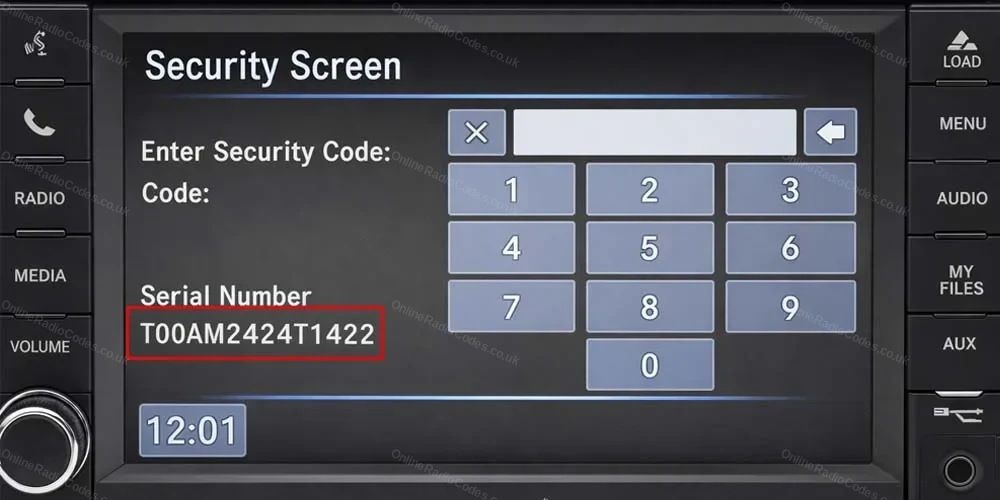
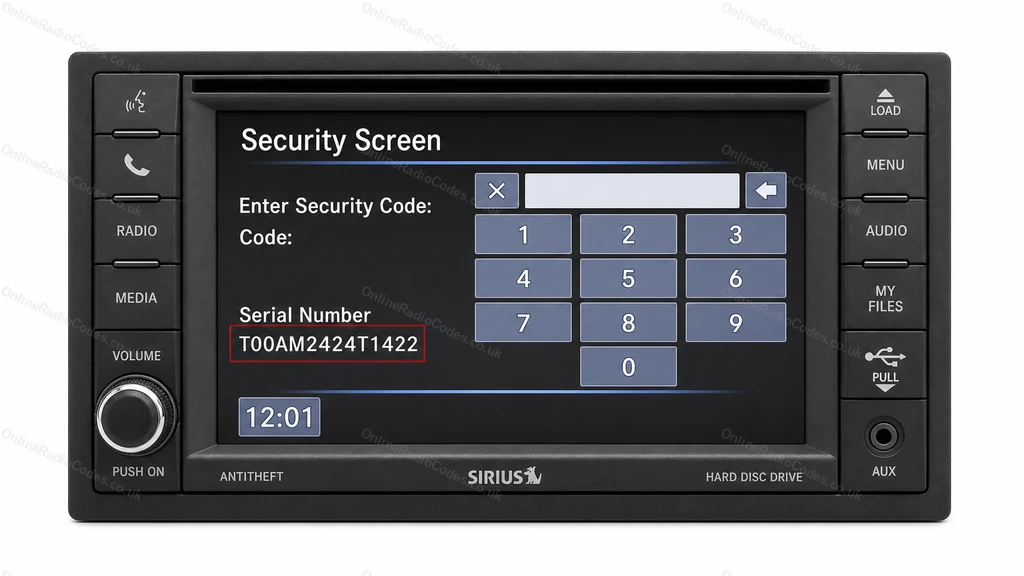
MyGIG and Uconnect 430 touchscreens (a screen with a column of buttons down each side) show the serial on the screen that asks for the code.

Turn on the ignition and radio. On the Security Screen, find Serial Number: it starts with T00AM, or sometimes T00BE, for example T00AM2424T1422. Type it exactly as shown. The two characters after the T are zeros, not the letter O.

If your screen asks for the code but shows no serial, the serial is on the label on the radio casing, so the radio needs to come out.
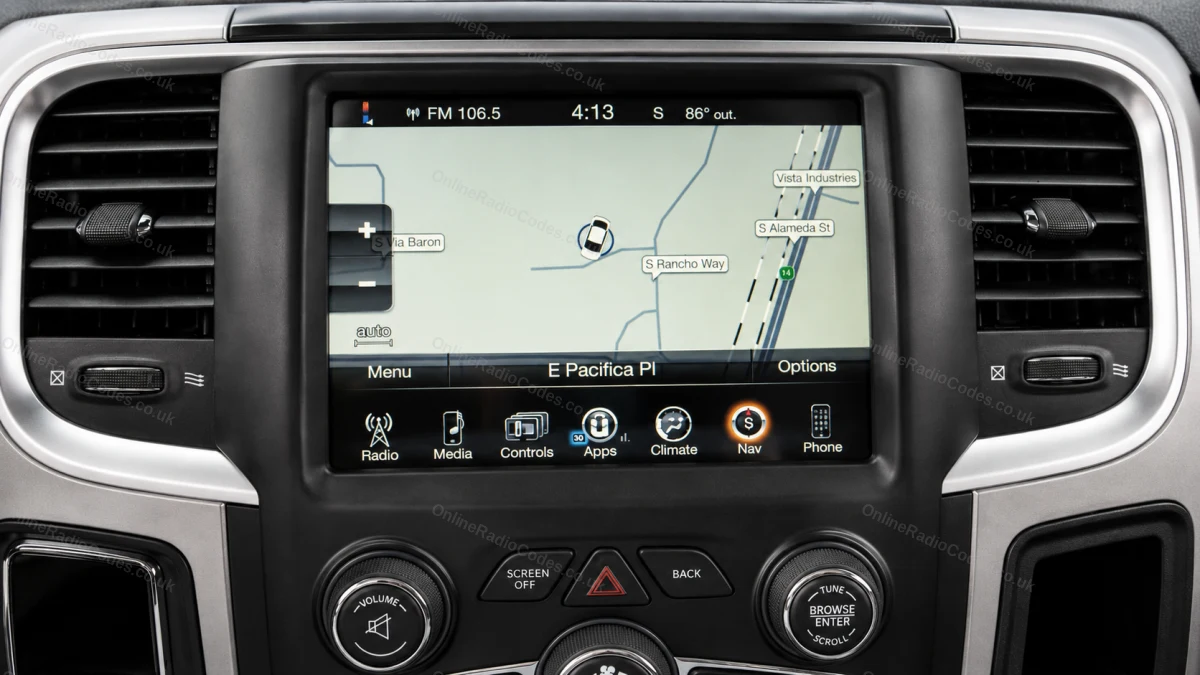
Uconnect touchscreen, no serial number on screen (T00BE, TM9, T0MY)
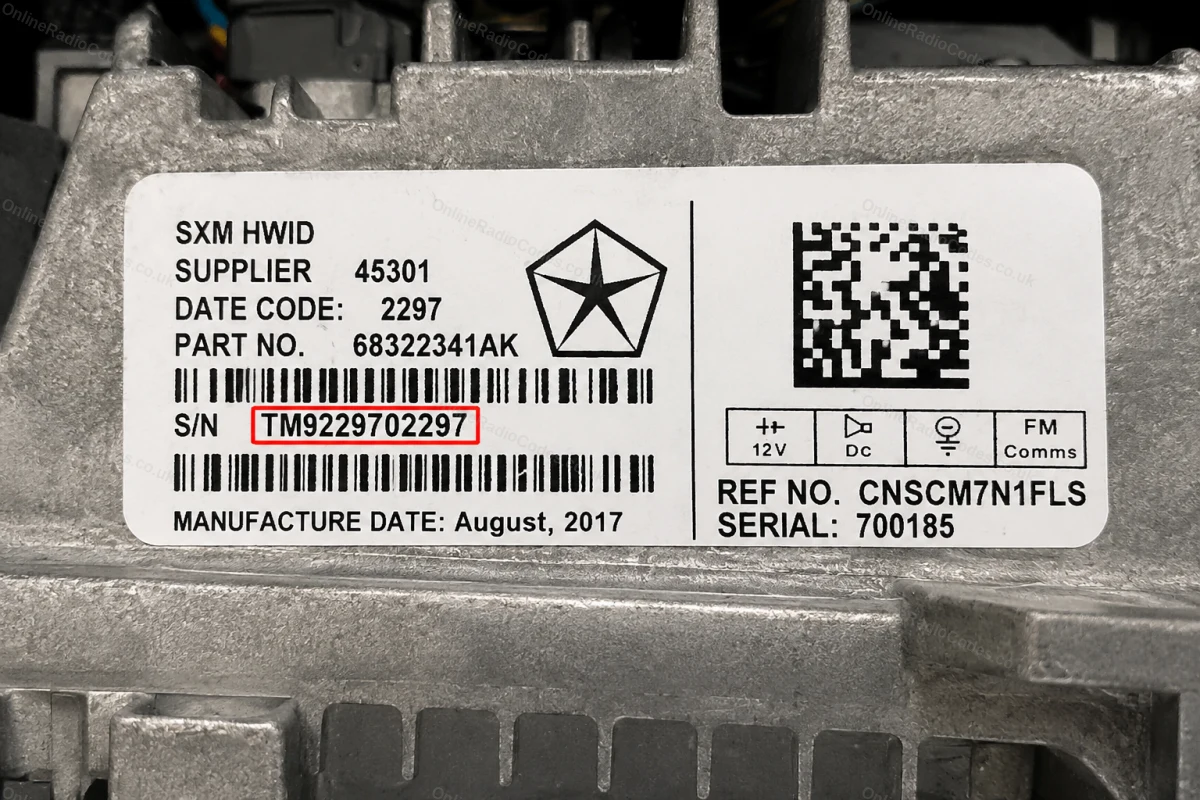
Read the serial number on the radio label
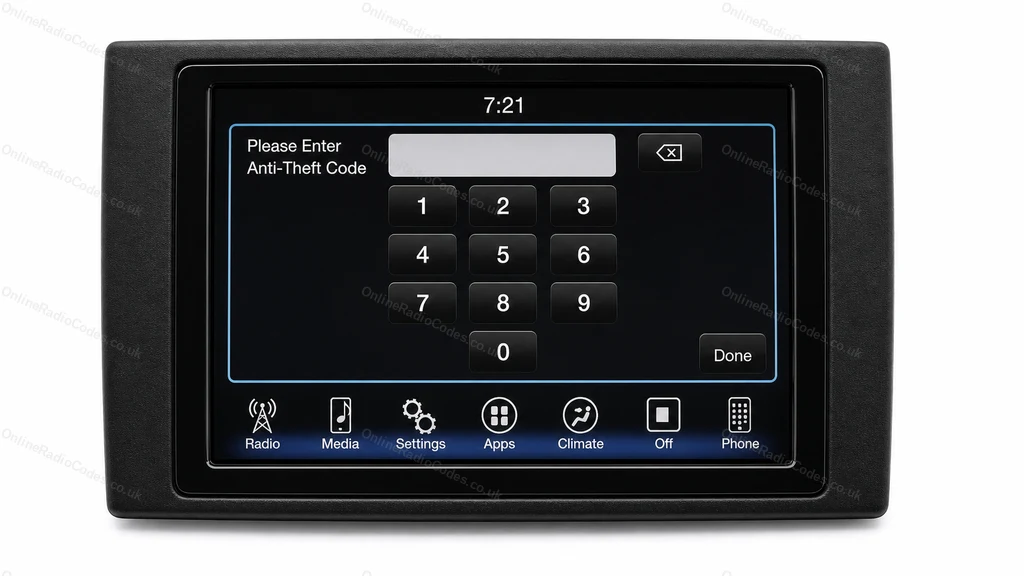
Uconnect 8.4 inch and 7 inch touchscreens ask for the code without showing a serial, so the serial has to be read from the radio itself.

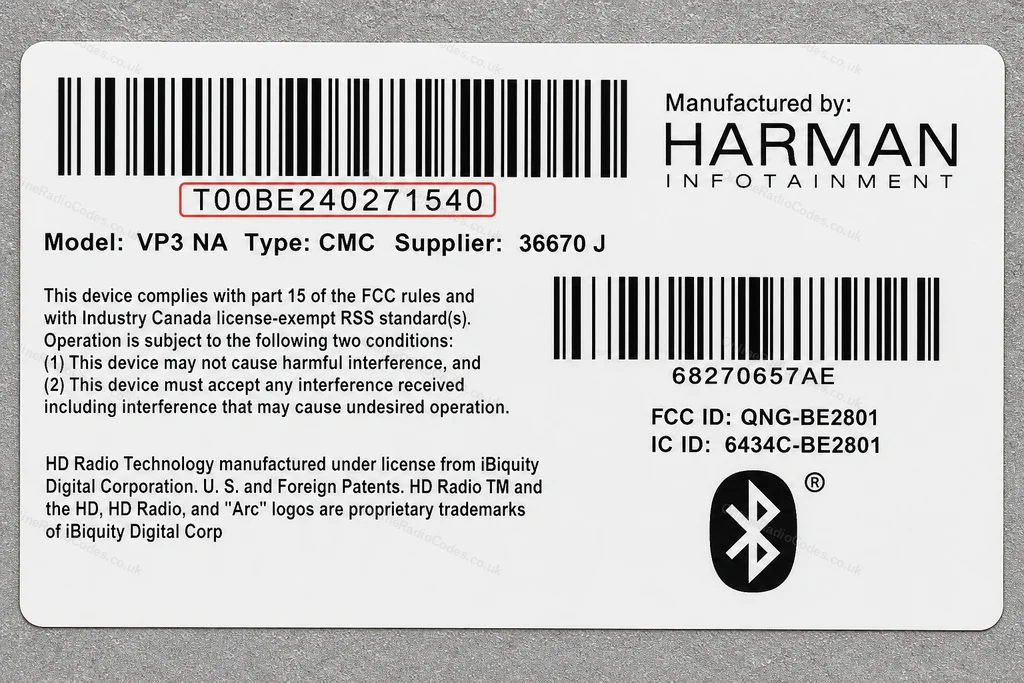
Remove the radio and find the white label on the casing. The serial is printed next to S/N or under a barcode and starts with T00BE (made by Harman), TM9 (Panasonic) or T0MY (Delphi or Aptiv), for example T00BE240271540, TM9229702297 or T0MYD120911994. Type it as one line with no spaces. The characters after the T in T00BE and T0MY are zeros.

Do not use the part number (starting P05 or 68).
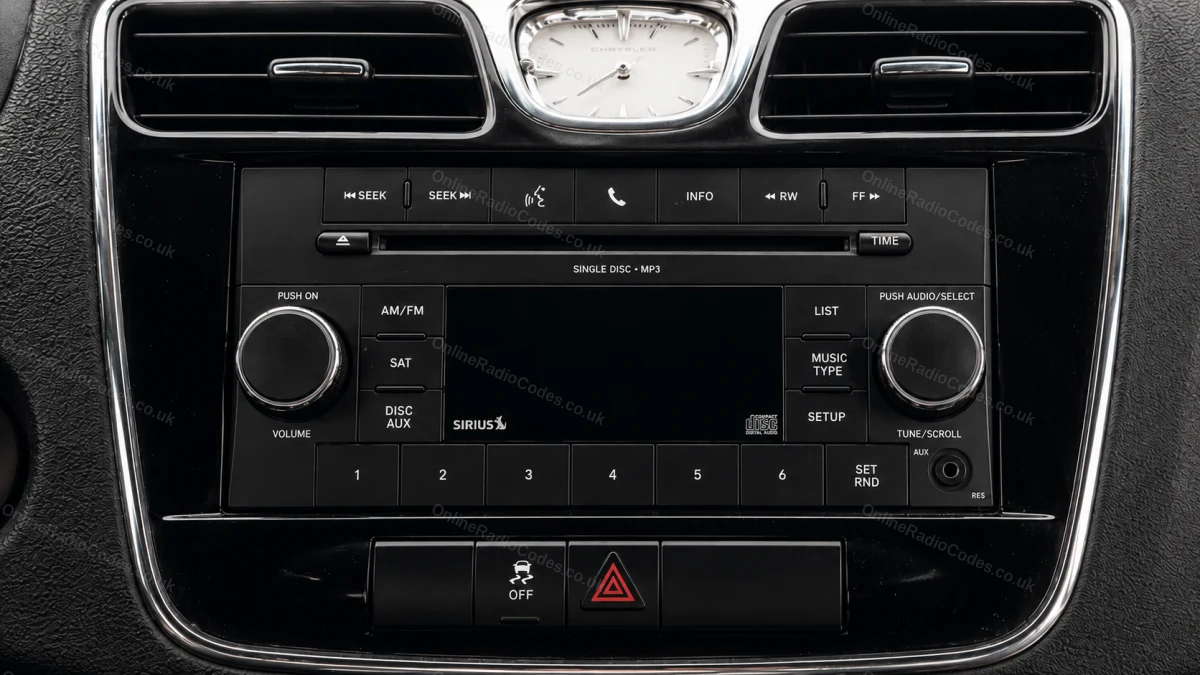
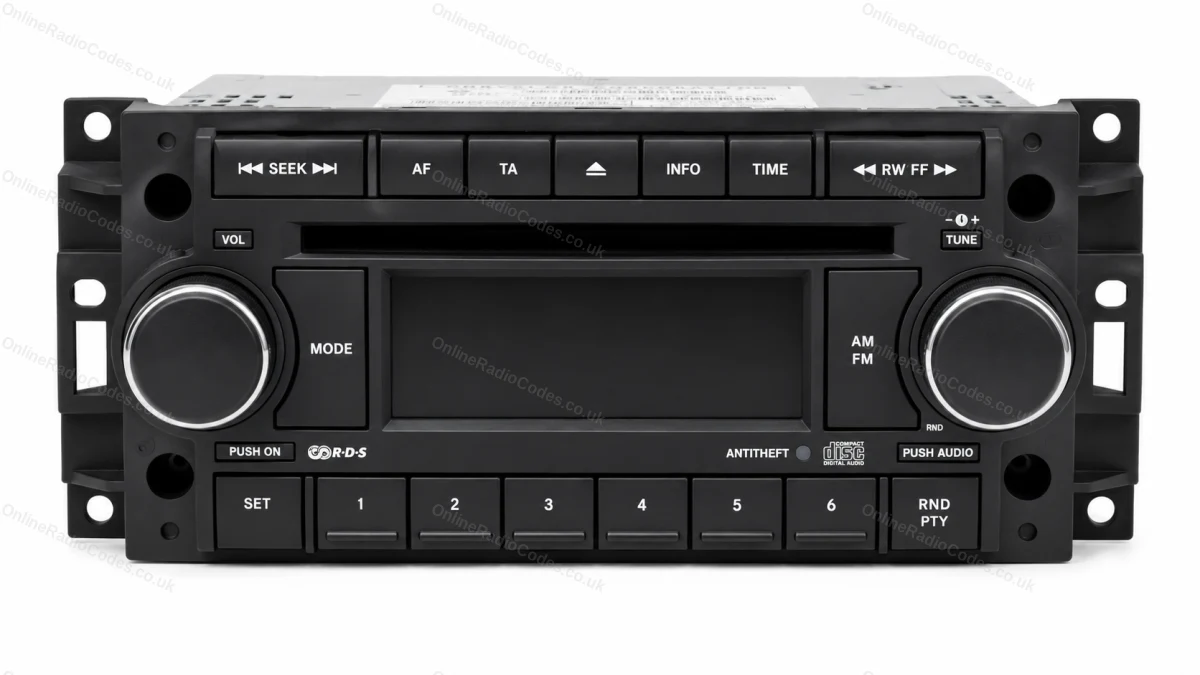
CD radio (T16QN, T19QN, T25QN, T30QN, T82QN)
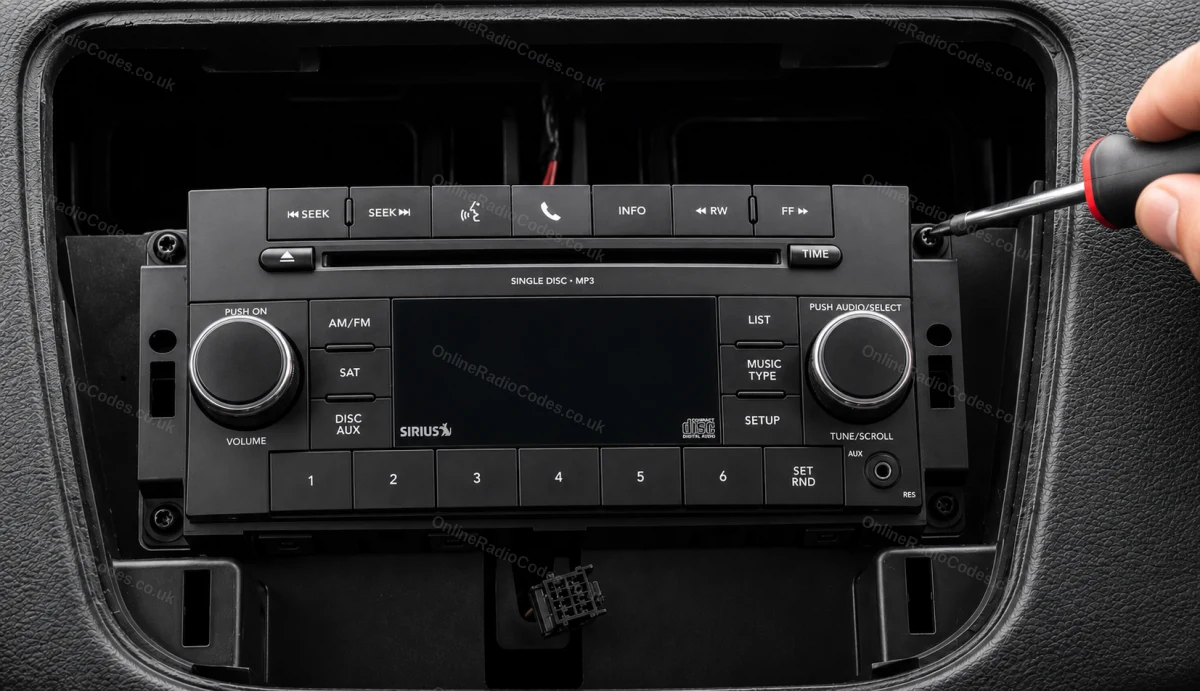
Remove the radio and read the QN serial number
These radios do not show the serial on screen, so remove the radio: unclip the trim, undo the screws (usually four) and slide the unit forward. No need to unplug it.

Look for S/N on the casing label. These serials start with T, two digits and QN, for example T19QN233210055 or T16QN270113026. Some labels print it with spaces (T 16 QN 270 1 13026): type it as one line. The model name on the label, such as RES or REQ, is not the serial.

A few of these radios carry a serial starting TQN, or T, two digits and AH: enter it the same way. Do not use the part number (starting P05 or 68) or the ESN.
Uconnect 5 inch touchscreen (TVPQN)
Read the TVPQN serial number on the label
The 5 inch Uconnect touchscreen (a small screen with buttons each side and two knobs below) does not show the serial on screen. Remove the radio and find the label on the casing.

On most of these, made by Continental, the serial starts TVPQN, for example TVPQN23940JDP1, and is printed next to S/N. Enter the whole serial, including the letters at the end.

If the serial on your label starts T0MY or TM9 instead, enter that one.
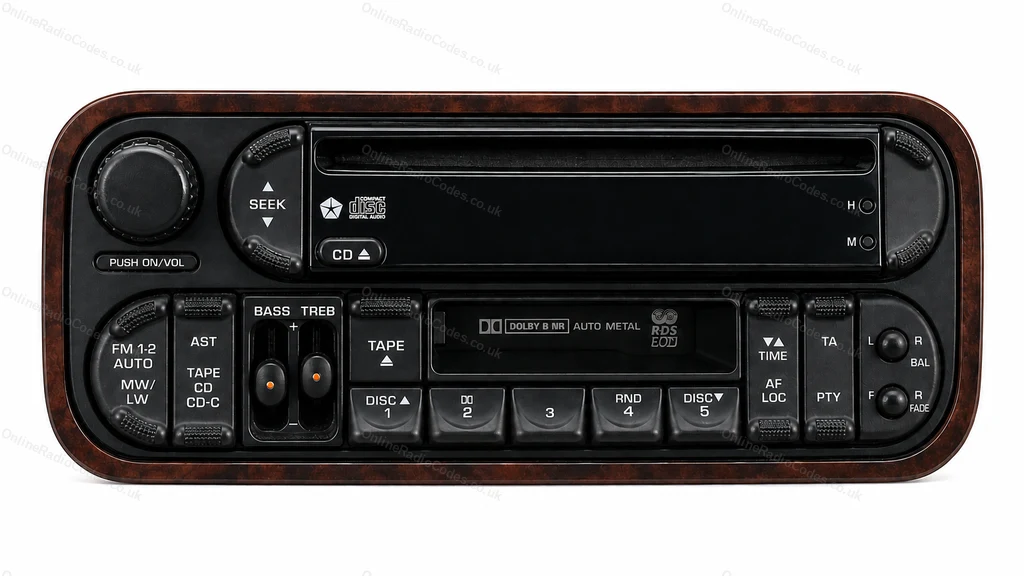
Older CD or cassette radio (TQ1AA, TCAAA, TH1AA, TT1AA)
Read the AA serial number on the radio label
Older CD and cassette radios, for example in the Voyager, Caravan and Cherokee, have a serial with AA in it, such as TQ1AA0170A7894, TCAAA0494K7301 or TH1AA0247J4334. Remove the radio: the serial is on the casing label next to S/N.

These codes only use the digits 1 to 5, so you enter them with the preset buttons 1 to 5.
CD radio (T00AM)
Remove the radio and read the T00AM serial number
These radios do not show the serial on screen, so remove the radio: unclip the trim, undo the screws (usually four) and slide the unit forward. No need to unplug it.

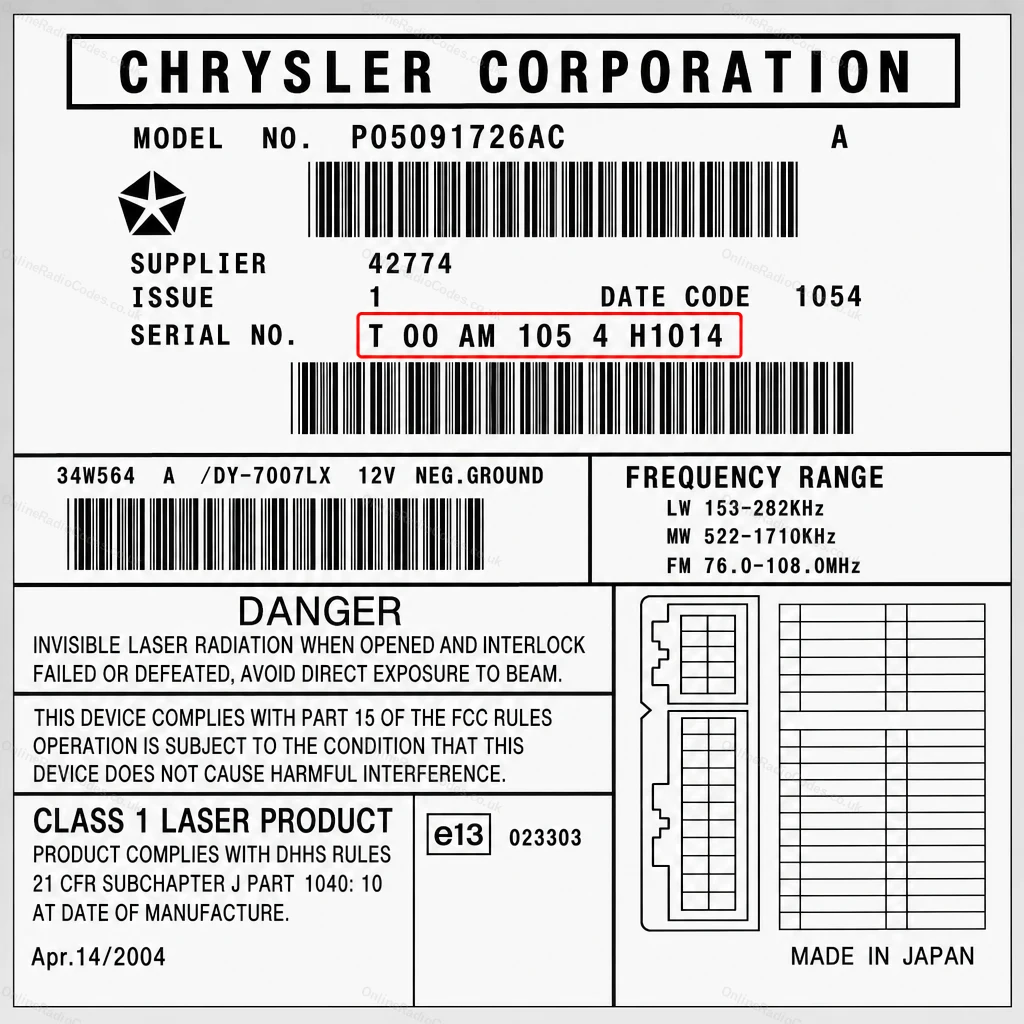
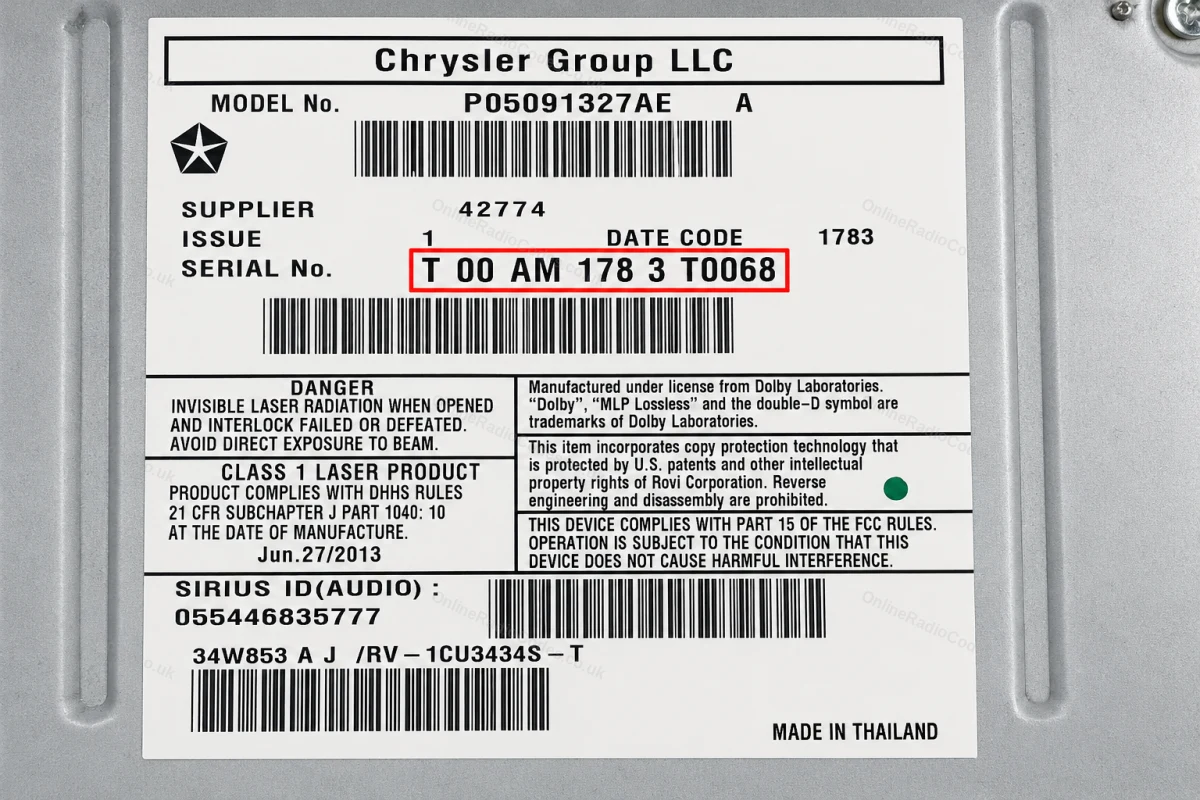
The serial is on the white label on the top or side of the casing, next to S/N or SERIAL NO. It is often printed with spaces (T 00 AM 105 4 H1014): type it as one line, T00AM1054H1014. The 00 are zeros.

Do not use the part number (starting P05 or 68) or the ESN.
Touchscreen with a separate radio box (TZ1AA)
Read the TZ1AA serial number on the radio unit behind the screen
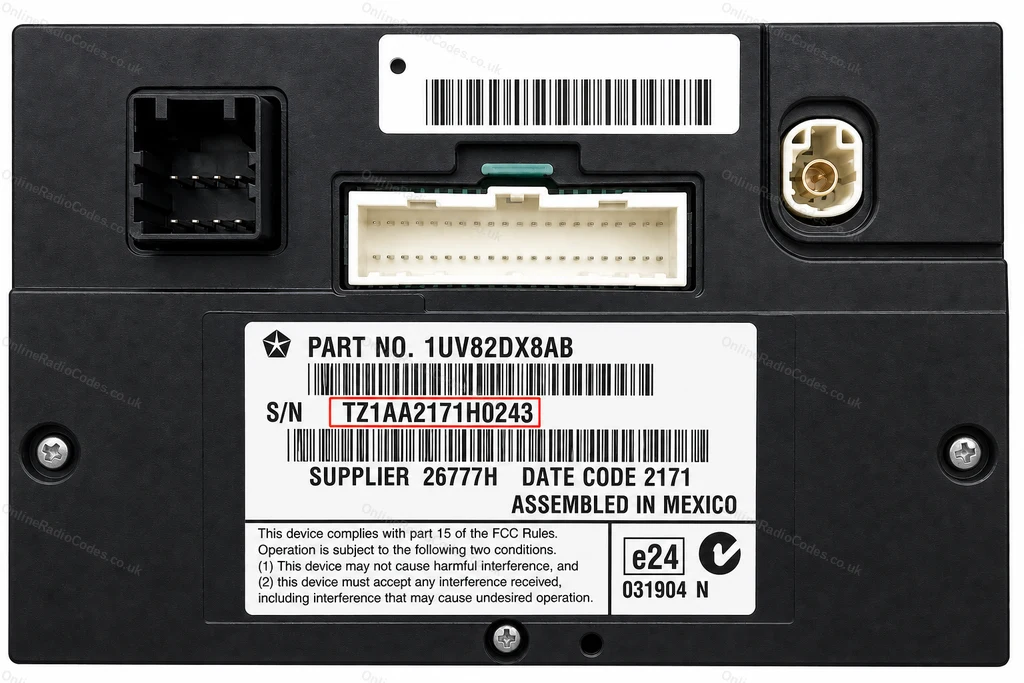
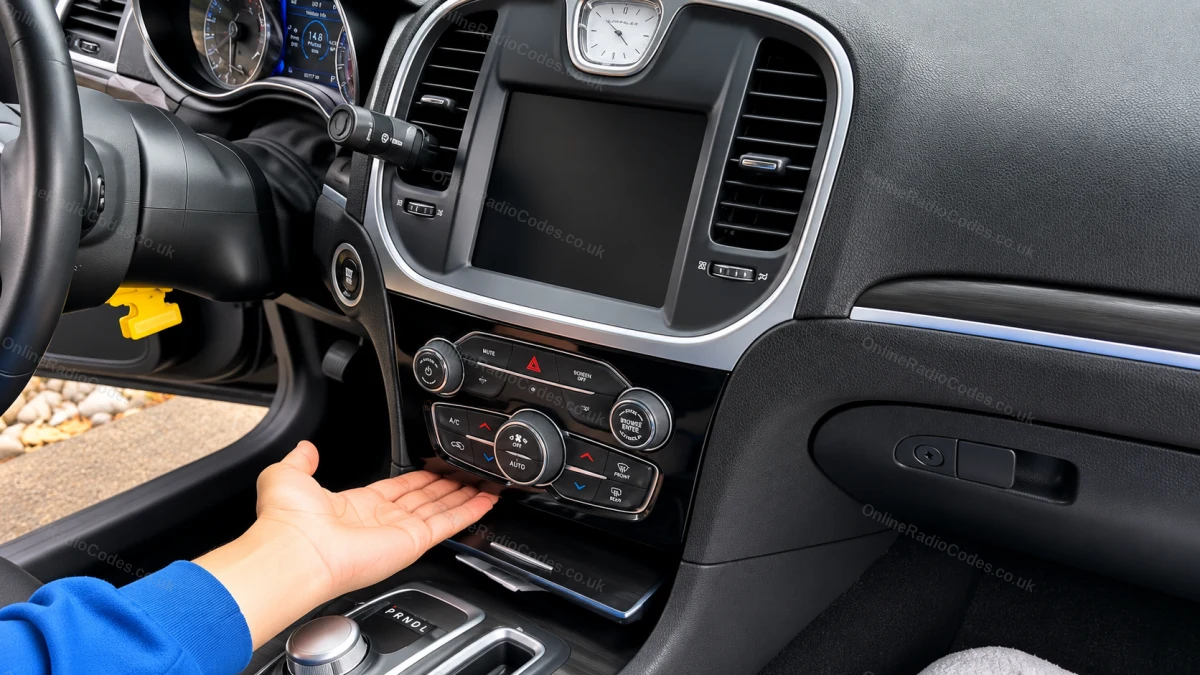
On the Chrysler 300, the Dodge Charger and some other Dodge models from 2011 on, the 4.3 inch or 8.4 inch touchscreen is only the display. The radio is a separate box behind it, and the serial is on the label on that box, not on the screen.

Find the white label on the box. The serial is next to S/N and starts TZ1AA, for example TZ1AA2171H0243. Type it as one line. If the serial on your label starts TM9 or T00BE instead, enter that one.

TZ1AA codes only use the digits 1 to 5. Enter the code on the touchscreen keypad.
Remove the radio and read the serial number on its label
Uconnect 5, 2021 on (T0012, T0071, T00AD)
Remove the radio and read the serial number on its label
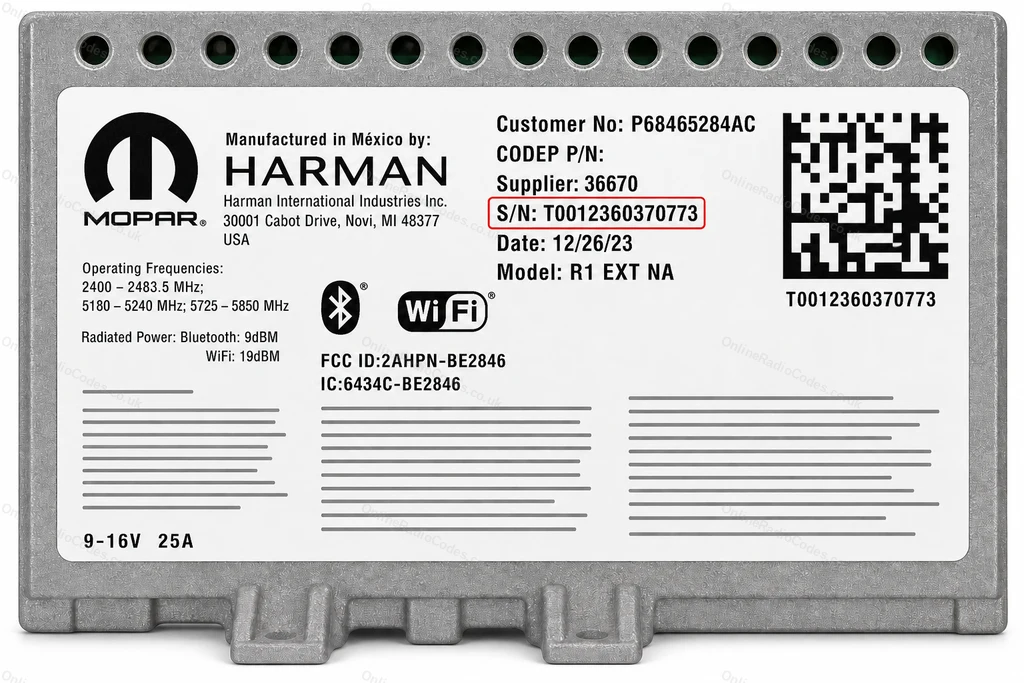
Uconnect 5 radios, fitted from 2021 in models such as the Dodge Durango, do not show the serial on screen. Remove the radio and find the label on the casing.

The serial starts T0012, T0071 or T00AD, for example T0012360370773. The characters after the T are zeros. Type it as one line with no spaces.
Can't find it? Contact us. We'll help you locate your serial before you pay a penny.

Since 2015 · 1 million decodes

The World’s Leading Chrysler Radio Code Service

A Decade of Decoding
Retrieving car radio codes since 2015, with more than a million codes delivered. Registered UK company No. 09736186. Read our story
Your Code, Fast
Most codes appear on screen the moment payment clears. The rest are handled by our team, usually within the hour in business hours.
Works, or Your Money Back
If your code does not work, we refund you in full. One of the very few radio code services that backs every single order.
Your Code, Kept for Life
Lose your code in five years? We keep it on file and will resend it free of charge, as many times as you need.

Real people, worldwide, around the clock

Meet our radio experts

A small team who have decoded radios for a decade, with Nova, our AI assistant, covering around the clock. Wherever you are in the world, we're here to help.

Live chat and email 24/7. Phones Monday to Friday, UK hours.

  • Gavin Wilson Gavin
  • Emma Keevney Emma
  • Lucy Flynn Lucy
  • Leah Holloway Leah
  • Liz Wilson Liz
  • Nova, our AI assistant Nova 24/7

Popular models

Chrysler radio codes by model

Go straight to the guide for your model.

FAQ

Frequently asked questions

Why does my Chrysler radio need a code?
Chrysler radios have a factory security lock that activates when power is cut. A flat battery, a battery change or the radio being removed will all trigger it. The code is unique to each radio unit.
What does a Chrysler serial number look like?
Serials start with T, for example T00AM, T00BE, T19QN, TM9, TVPQN, TZ1AA or T0MY. Continental units use a long number starting A2C or A3C instead. Many touchscreens show the serial on the code screen; on other radios it is on the label on the casing. Choose your radio at the top of this page to see exactly where yours is.
How long does delivery take?
Most Chrysler radio codes are delivered by email within 60 minutes of ordering. Some serial types are delivered faster.
Which Chrysler models does this cover?
We cover all Chrysler models. If your Chrysler radio is asking for a code, we can retrieve it.
Do I need special tools to remove the radio?
A prying tool and a Phillips screwdriver are typically sufficient. Some models may need a trim removal tool to avoid scratching the dashboard.
My code does not work. What should I do?
Check the full serial including the prefix. If the serial is correct and the code fails, contact us. All codes are guaranteed.
Is Dodge covered by this service too?
Dodge vehicles often share the same radio platform as Chrysler. We have a dedicated Dodge radio code page, or you can submit the serial here if it matches the Chrysler T-series or A2C format.
Will the code work again after my next battery change?
Yes. The code is permanently linked to your radio. Keep it stored safely for future use.
How do I enter the code?
Turn the ignition to RUN and switch the radio on. Enter the four digits with the preset buttons in order, or with the keypad on a touchscreen; your code email explains the entry for your radio. After three wrong tries the radio shows WAIT: leave it switched on with the ignition in RUN for 30 minutes, then try again.
Where is the serial on a touchscreen radio?
Many touchscreen and sat nav radios show it on the Security Screen that asks for the code, next to Serial Number. If yours does not, the serial is on the label on the radio casing. Choose your radio at the top of this page to see where yours is.
Is it a zero or the letter O?
In T00AM, T00BE and T0MY serials the characters after the T are zeros. If you type the letter O we correct it for you.
Which numbers on the label are not the serial?
The part number (starting P05 or 68), the ESN, the model name such as RES or REQ, and the short S/N on a Continental label are not the serial. Your car's VIN is not the serial either. The serial starts with T, or with A2C or A3C on Continental units.

Verified · Trustpilot

Don't just take our word for it

See all reviews on Trustpilot
5 stars
13 hours ago Trustpilot

Lost my radio code due to a recent…

Lost my radio code due to a recent battery change. Requested my radio code and received it the very next day and it worked. All back up and running. Fantast…

Andrea Marsden · GB
4 stars
13 hours ago Trustpilot

A fairly easy website to use.

A fairly easy website to use.I’m well over 80 and got my code from you and installed my car radio in minutes.

Shelagh · GB
5 stars
14 hours ago Trustpilot

Quick and simple way to get the correct…

Quick and simple way to get the correct code which worked first time. Did try a cheaper website but they could not find the code so best to go straight to th…

Gareth Dyer · GB
5 stars
16 hours ago Trustpilot

Everything was quick and accurate

Everything was quick and accurate. I will use them again if needed. Highly recommend ....

Rev Rob · US
5 stars
17 hours ago Trustpilot

Code reçu rapidement

Code reçu rapidement ! Tout est parfait !

Christophe · FR
5 stars
18 hours ago Trustpilot

Straight forward easy service

Straight forward easy service , Very happy.Code worked , so Happy Happy Happy

Desmond Oconnor · IE
5 stars
18 hours ago Trustpilot

Paid for service at 9 o clock on a…

Paid for service at 9 o clock on a Monday night had my code within 20 minutes

Conor Ohagan · IE
5 stars
19 hours ago Trustpilot

Got my code within 24 hours and it…

Got my code within 24 hours and it worked

kim lake · AU
5 stars
1 day ago Trustpilot

Might take a couple of days but great service!

First code didn’t work and had me worried, but as soon as I sent an email they replied asking for more information. A day and a half later they sent me a new…

dd bb · IL
4 stars
1 day ago Trustpilot

They gave me the code in 3 1/2 hours…

They gave me the code in 3 1/2 hours which isnt too bad considering it was a sunday. The code worked!

sesame street · GB
5 stars
1 day ago Trustpilot

Very quick and easy service and a great…

Very quick and easy service and a great price

Alan Bull · GB
See our 22,840 reviews on Trustpilot
Ready to unlock your Chrysler radio?

Enter your serial number above and get your unlock code in seconds.

Get my code now
OnlineRadioCodes.co.uk is an independent radio code retrieval service and is not affiliated with Stellantis N.V., Chrysler LLC or any of their subsidiaries. All radio codes are sourced from official databases. Chrysler and all model names are trademarks of their respective owners.
Get my radio code